Home / Life & Family Budgets / Travel Planner

Life & Family Budgets

Travel Planner Spreadsheet

Plan your trip budget, log costs in any currency, count down to departure and know exactly how much you can spend each day.

Light-mode dashboardExcel + Google SheetsInstant download

$5.99 USD, one-time

Coming soon to Etsy · $5.99
  • Sample-data and blank versions
  • No macros, no subscription
  • Editable currency and categories
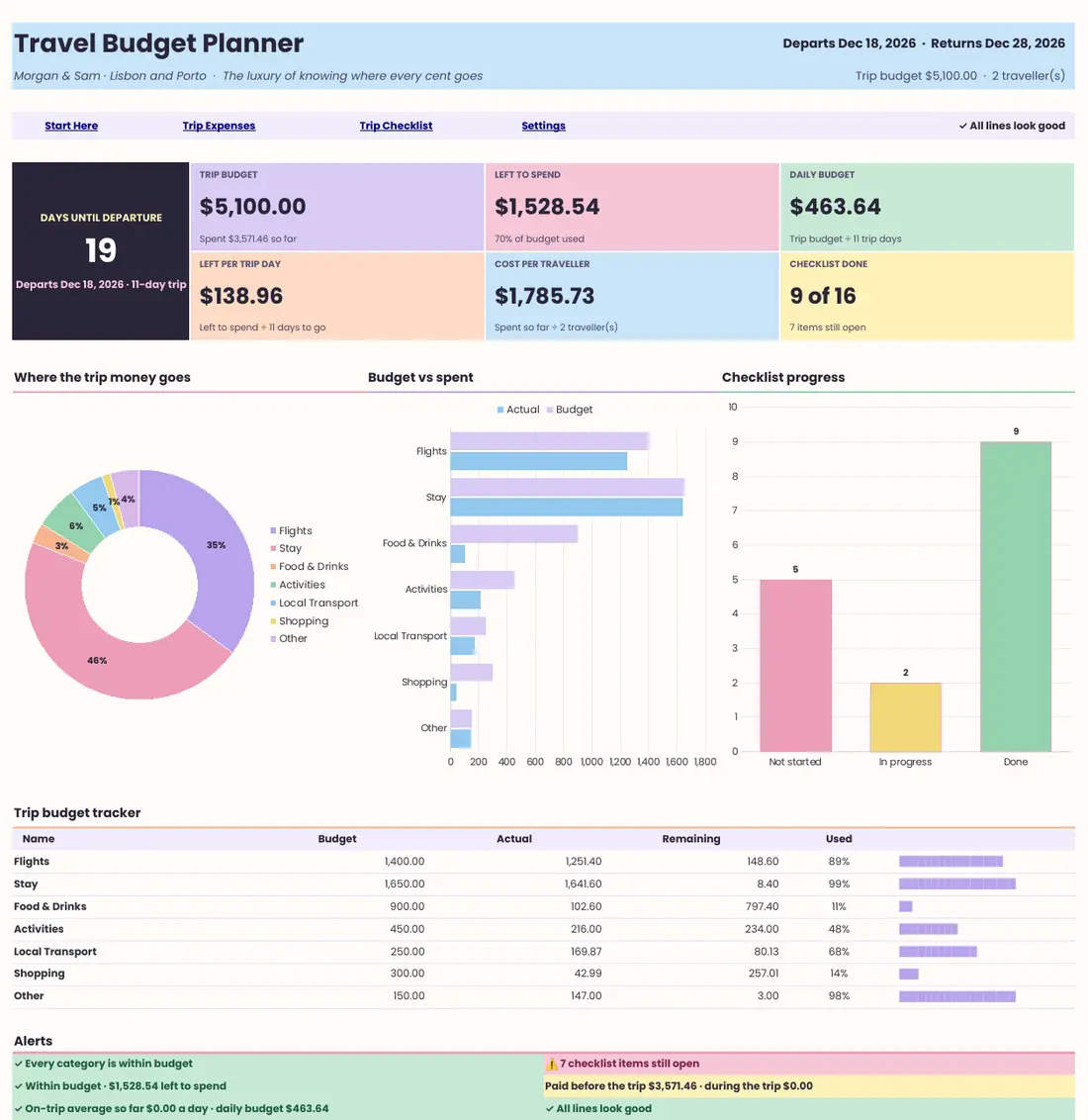
Travel Planner spreadsheet dashboard with KPI cards and charts
The real dashboard, shown with sample data. Tap to enlarge.

What the dashboard shows

KPI cards

  • Days until departure
  • Trip budget
  • Left to spend
  • Daily budget
  • Left per trip day
  • Cost per traveller
  • Checklist done

Charts

  • Where the trip money goes
  • Budget vs spent
  • Checklist progress

Tracker panel

Trip budget tracker

Alerts

Plain-English warnings when something is over budget, overdue or needs checking, and a green tick when all is well.

What’s inside

  • Start Here – a short guide to set up in minutes
  • Dashboard – KPI cards, charts, trackers and alerts
  • Trip Expenses – One line per payment. Enter the amount as charged and pick the currency it was paid in. Home amount converts itself using the exchange rate on Settings. Use a minus amount for a refund.
  • Trip Checklist – Everything to book, sort and pack. Add a due date if it helps, and change the status as you go.
  • Settings – your name, currency, categories and rates

Perfect for

  • Holidays, honeymoons and family trips
  • Trips where you spend in more than one currency
  • Groups who want a clear trip budget before booking

How to use it

  1. Settings: add your trip name, home currency symbol, the trip currency code and today's exchange rate.
  2. Settings: add your departure and return dates and how many people are travelling.
  3. Settings: set a budget for each trip category (rename categories to suit your trip).
  4. Trip Checklist: list what you need to book, sort and pack. Change the status as you go.
  5. Trip Expenses: log every payment, pick the currency it was paid in and whether it was before or during the trip.
  6. Dashboard: see your countdown, what is left to spend and how much you can spend per trip day.

Good to know

  • Exchange rate = how much 1 unit of the trip currency costs in your home currency (e.g. 1 EUR = 1.08 USD). Update it any time; all converted amounts update.
  • 'Left per trip day' = budget not yet spent รท trip days still to go (all trip days before you leave).
  • On-trip daily average only counts lines marked 'During trip'. Use a minus amount for a refund.

Questions

Does the Travel Planner work in Google Sheets?

Yes. The download includes an Excel file (.xlsx) and a link to make your own Google Sheets copy. The totals and charts carry across; chart colors in Google Sheets can look slightly different from the Excel version.

Can I change the currency and categories?

Yes. Set your currency symbol, names and categories on the Settings tab. Yellow cells are for typing; formula cells are protected without a password.

Is it a subscription?

No. It is a one-time purchase of $5.99 USD on Etsy with no macros and nothing to renew.

You may also like