Home / Life & Family Budgets / Party & Event Budget

Life & Family Budgets

Party & Event Budget Spreadsheet

Plan any party or event: set the budget, track every vendor's deposit and balance, manage RSVPs and see the real cost per guest.

Light-mode dashboardExcel + Google SheetsInstant download

$6.99 USD, one-time

Coming soon to Etsy · $6.99
  • Sample-data and blank versions
  • No macros, no subscription
  • Editable currency and categories
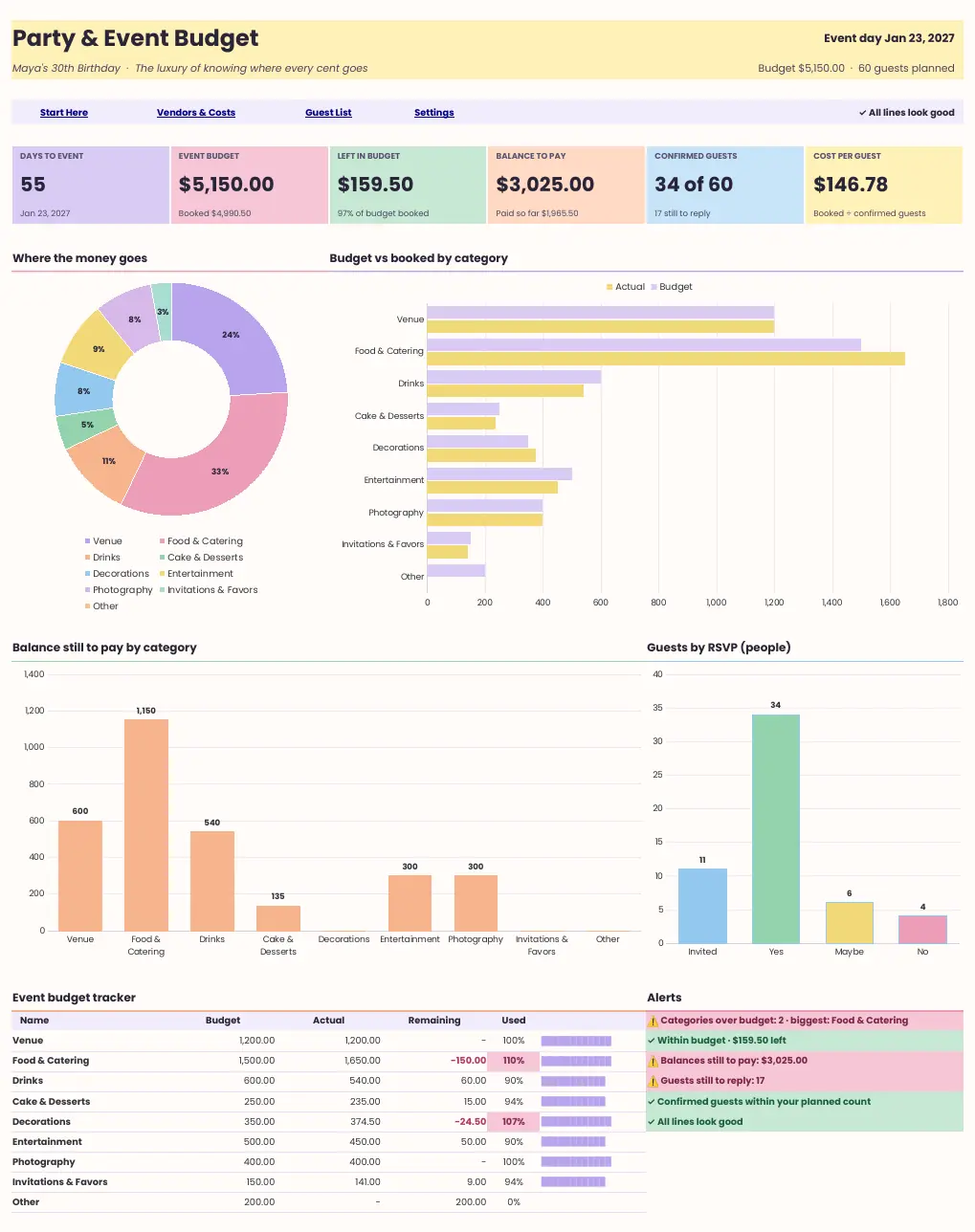
Party & Event Budget spreadsheet dashboard with KPI cards and charts
The real dashboard, shown with sample data. Tap to enlarge.

What the dashboard shows

KPI cards

  • Days to event
  • Event budget
  • Left in budget
  • Balance to pay
  • Confirmed guests
  • Cost per guest

Charts

  • Where the money goes
  • Budget vs booked by category
  • Balance still to pay by category
  • Guests by RSVP (people)

Tracker panel

Event budget tracker

Alerts

Plain-English warnings when something is over budget, overdue or needs checking, and a green tick when all is well.

What’s inside

  • Start Here – a short guide to set up in minutes
  • Dashboard – KPI cards, charts, trackers and alerts
  • Vendors & Costs – One line per vendor or purchase. Enter the full cost and what you have paid so far. Balance due calculates itself.
  • Guest List – One line per invitation. Party size = how many people that invitation covers (plus-ones and kids included).
  • Settings – your name, currency, categories and rates

Perfect for

  • Birthdays, showers, anniversaries and graduations
  • Tracking vendor deposits and balances
  • Managing a guest list and RSVPs

How to use it

  1. Settings: add your event name, currency symbol, event date and planned guest count.
  2. Settings: set a budget for each category (rename them to fit your party, shower, reunion or event).
  3. Vendors & Costs: add every vendor or purchase with its full cost, what you have paid and when the balance is due.
  4. Guest List: add each invitation with its party size and update the RSVP as replies come in.
  5. Dashboard: see your countdown, budget left, balances to pay, confirmed guests and the real cost per guest.

Good to know

  • 'Booked' = the full cost of every vendor line, paid or not. 'Balance to pay' = booked minus paid so far.
  • Cost per guest = booked costs รท guests who said Yes (people, not invitations).
  • 'Still to reply' counts people marked Invited or Maybe.

Questions

Does the Party & Event Budget work in Google Sheets?

Yes. The download includes an Excel file (.xlsx) and a link to make your own Google Sheets copy. The totals and charts carry across; chart colors in Google Sheets can look slightly different from the Excel version.

Can I change the currency and categories?

Yes. Set your currency symbol, names and categories on the Settings tab. Yellow cells are for typing; formula cells are protected without a password.

Is it a subscription?

No. It is a one-time purchase of $6.99 USD on Etsy with no macros and nothing to renew.

You may also like