Home / Small Business Trackers / Supplier & Bills-to-Pay Tracker

Small Business Trackers

Supplier & Bills-to-Pay Tracker Spreadsheet

Know exactly what you owe each supplier, what is overdue and what must be paid in the next 7 days, so nothing slips.

Dark-mode dashboardExcel + Google SheetsInstant download

$9.99 USD, one-time

Coming soon to Etsy · $9.99
  • Sample-data and blank versions
  • No macros, no subscription
  • Editable currency and categories
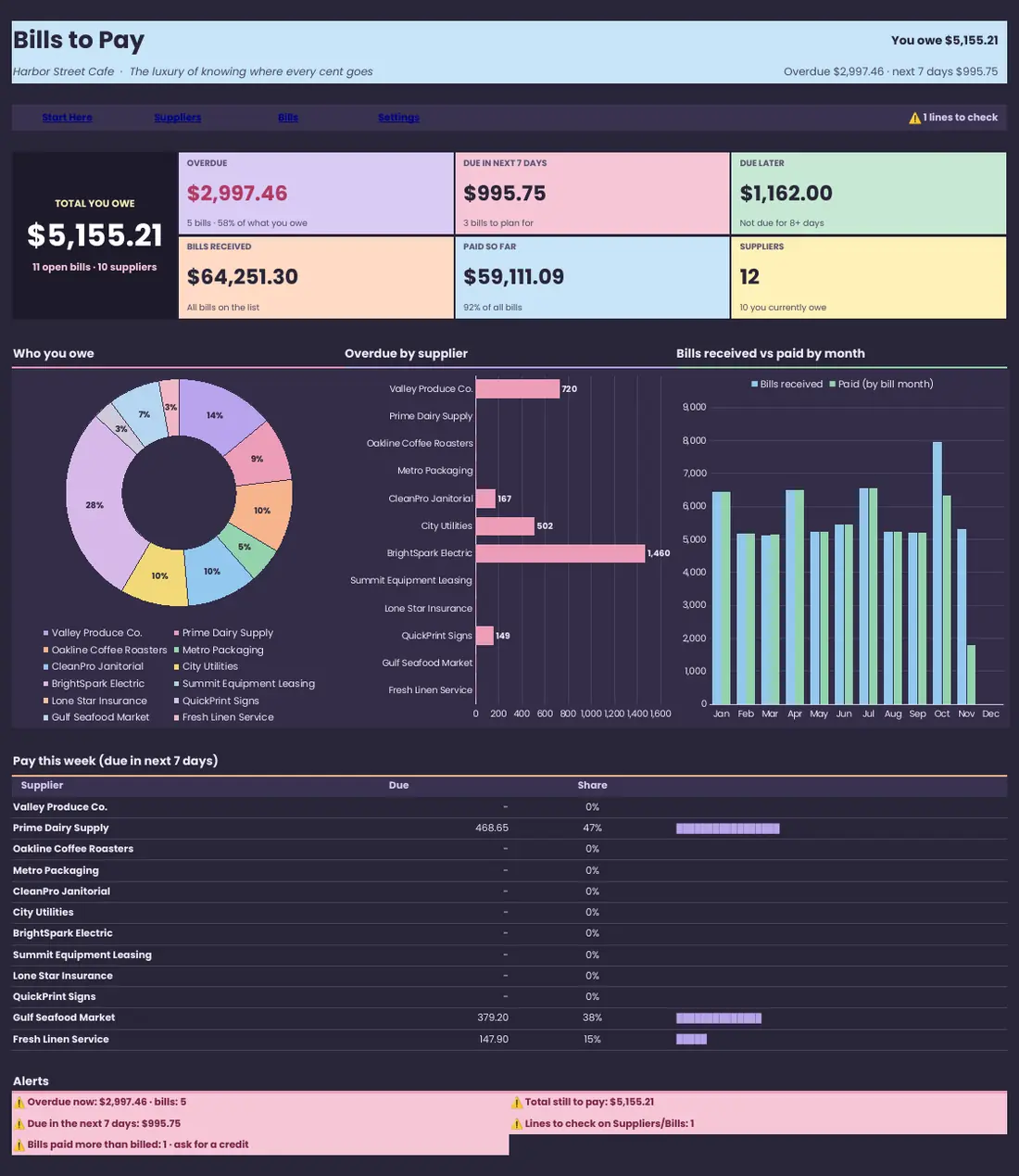
Supplier & Bills-to-Pay Tracker spreadsheet dashboard with KPI cards and charts
The real dashboard, shown with sample data. Tap to enlarge.

What the dashboard shows

KPI cards

  • Total you owe
  • Overdue
  • Due in next 7 days
  • Due later
  • Bills received
  • Paid so far
  • Suppliers

Charts

  • Who you owe
  • Overdue by supplier
  • Bills received vs paid by month

Tracker panel

Pay this week (due in next 7 days)

Alerts

Plain-English warnings when something is over budget, overdue or needs checking, and a green tick when all is well.

What’s inside

  • Start Here – a short guide to set up in minutes
  • Dashboard – KPI cards, charts, trackers and alerts
  • Suppliers – One line per supplier. Payment terms = days you have to pay after the bill date (0 = due on receipt). Totals fill in from the Bills sheet.
  • Bills – One line per supplier bill. Due date comes from the supplier's terms. Type what you have paid so far - the balance and status update by themselves.
  • Settings – your name, currency, categories and rates

Perfect for

  • Small businesses paying suppliers on terms
  • Seeing what is overdue and due this week
  • Keeping supplier balances in one place

How to use it

  1. Settings: add your business name, currency symbol and the year for the monthly chart.
  2. Suppliers: add each supplier and their payment terms in days (e.g. 30 for net 30, 0 for due on receipt).
  3. Bills: add every supplier bill with its bill number, bill date and amount. The due date fills in from the terms.
  4. Each time you pay, update 'Paid so far' on that bill. Balance and status update by themselves.
  5. Dashboard: see what is overdue, what to pay this week and who you owe the most.

Good to know

  • Status uses today's date: 'Overdue' = past the due date and not fully paid; 'Due in 3 d' = days left to pay.
  • This sheet only tracks money YOU owe suppliers (accounts payable), not money customers owe you.
  • The sample statuses are based on the day you open the file, so they will change over time.

Questions

Does the Supplier & Bills-to-Pay Tracker work in Google Sheets?

Yes. The download includes an Excel file (.xlsx) and a link to make your own Google Sheets copy. The totals and charts carry across; chart colors in Google Sheets can look slightly different from the Excel version.

Can I change the currency and categories?

Yes. Set your currency symbol, names and categories on the Settings tab. Yellow cells are for typing; formula cells are protected without a password.

Is it a subscription?

No. It is a one-time purchase of $9.99 USD on Etsy with no macros and nothing to renew.

You may also like