Home / Small Business Trackers / Hair Stylist Bookkeeping

Small Business Trackers

Hair Stylist Bookkeeping Spreadsheet

Log each client in seconds and see your takings, tips, average ticket, best-earning services and real profit after chair rent.

Light-mode dashboardExcel + Google SheetsInstant download

$7.99 USD, one-time

Coming soon to Etsy · $7.99
  • Sample-data and blank versions
  • No macros, no subscription
  • Editable currency and categories
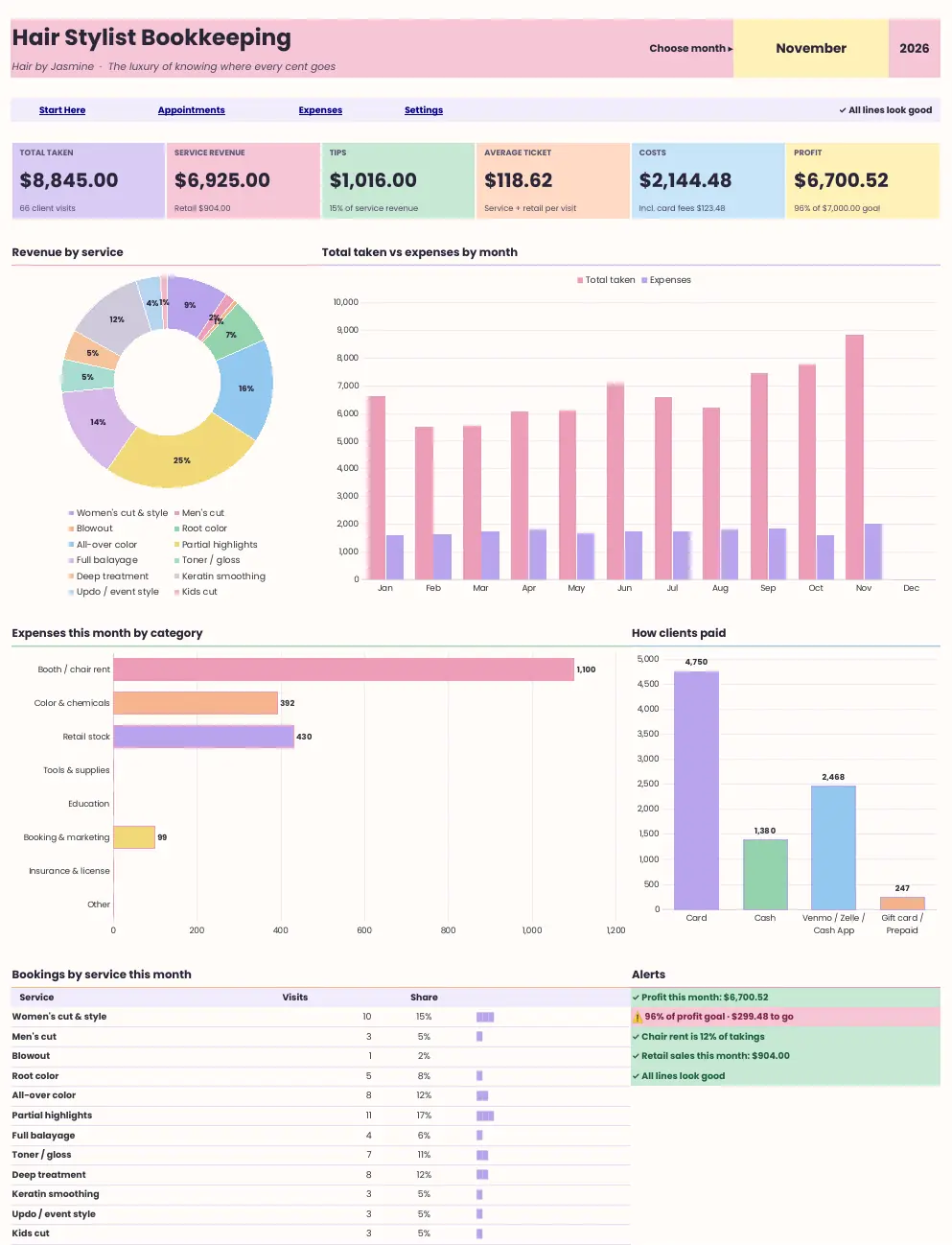
Hair Stylist Bookkeeping spreadsheet dashboard with KPI cards and charts
The real dashboard, shown with sample data. Tap to enlarge.

What the dashboard shows

KPI cards

  • Total taken
  • Service revenue
  • Tips
  • Average ticket
  • Costs
  • Profit

Charts

  • Revenue by service
  • Total taken vs expenses by month
  • Expenses this month by category
  • How clients paid

Tracker panel

Bookings by service this month

Alerts

Plain-English warnings when something is over budget, overdue or needs checking, and a green tick when all is well.

What’s inside

  • Start Here – a short guide to set up in minutes
  • Dashboard – KPI cards, charts, trackers and alerts
  • Appointments – One line per client visit. Pick the service and its usual price fills in. Type a price only if you charged something different.
  • Expenses – Chair or booth rent, color, retail stock, tools, classes and marketing. One line per payment.
  • Settings – your name, currency, categories and rates

Perfect for

  • Booth renters and salon suite stylists
  • Mobile and home-based hairdressers
  • Barbers who want takings, tips and best services at a glance

How to use it

  1. Settings: add your name, currency symbol, year, card processing fee % and monthly profit goal.
  2. Settings: rename your services and set your usual price for each one.
  3. Appointments: log each client visit - date, client, service, tip, retail products sold and how they paid.
  4. Only type a price in 'Different price?' when you charged something other than the usual price.
  5. Expenses: log chair or booth rent, color, retail stock, tools, classes and marketing.
  6. Dashboard: pick a month to see takings, tips, average ticket and profit.

Good to know

  • Total taken = service price + tip + retail products. Profit = total taken - expenses - card fees.
  • Card fee is worked out only for payments marked Card, using the % on Settings (editable).
  • The chair rent alert uses the first expense category on Settings. Keep rent as the first category.

Questions

Does the Hair Stylist Bookkeeping work in Google Sheets?

Yes. The download includes an Excel file (.xlsx) and a link to make your own Google Sheets copy. The totals and charts carry across; chart colors in Google Sheets can look slightly different from the Excel version.

Can I change the currency and categories?

Yes. Set your currency symbol, names and categories on the Settings tab. Yellow cells are for typing; formula cells are protected without a password.

Is it a subscription?

No. It is a one-time purchase of $7.99 USD on Etsy with no macros and nothing to renew.

You may also like