Home / Small Business Trackers / Photographer Business Tracker

Small Business Trackers

Photographer Business Tracker Spreadsheet

Track every session from deposit to final payment, see which packages earn the most and know exactly who still owes you.

Dark-mode dashboardExcel + Google SheetsInstant download

$9.99 USD, one-time

Coming soon to Etsy · $9.99
  • Sample-data and blank versions
  • No macros, no subscription
  • Editable currency and categories
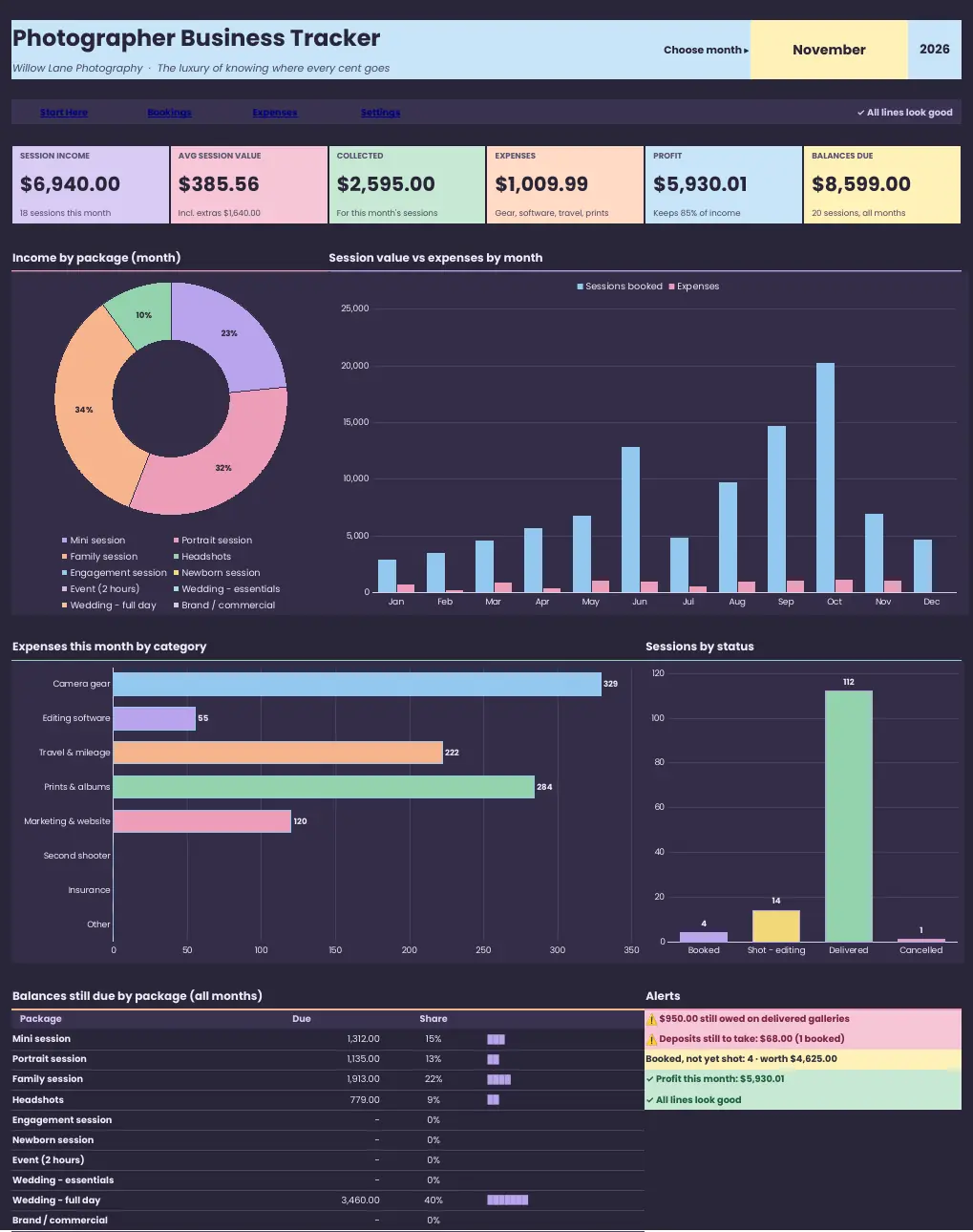
Photographer Business Tracker spreadsheet dashboard with KPI cards and charts
The real dashboard, shown with sample data. Tap to enlarge.

What the dashboard shows

KPI cards

  • Session income
  • Avg session value
  • Collected
  • Expenses
  • Profit
  • Balances due

Charts

  • Income by package (month)
  • Session value vs expenses by month
  • Expenses this month by category
  • Sessions by status

Tracker panel

Balances still due by package (all months)

Alerts

Plain-English warnings when something is over budget, overdue or needs checking, and a green tick when all is well.

What’s inside

  • Start Here – a short guide to set up in minutes
  • Dashboard – KPI cards, charts, trackers and alerts
  • Bookings – One line per session. Pick the package and its price fills in (type an agreed price only if different). Add prints or extras sold, the deposit and any later payments. Balance due works itself out.
  • Expenses – Gear, editing software, travel, prints, marketing and second shooters. One line per payment.
  • Settings – your name, currency, categories and rates

Perfect for

  • Wedding, portrait and family photographers
  • Tracking deposits, balances and session dates
  • Seeing which packages earn the most

How to use it

  1. Settings: add your studio name, currency symbol, year and your usual deposit %.
  2. Settings: rename your packages and set the price for each one.
  3. Bookings: add each session - date, client, package, deposit paid. Type an agreed price only if it differs from the package price.
  4. Bookings: update the status (Booked > Shot - editing > Delivered) and add later payments as they come in.
  5. Expenses: log gear, editing software, travel, prints, marketing and second shooters.
  6. Dashboard: pick a month to see income by package, profit, balances due and deposits still to take.

Good to know

  • Session total = session fee + prints & extras. Balance due = session total - deposit - later payments.
  • Cancelled sessions count only the money you kept (for example a non-refundable deposit).
  • Income is counted in the month of the session date, so you can see how busy each month really was.

Questions

Does the Photographer Business Tracker work in Google Sheets?

Yes. The download includes an Excel file (.xlsx) and a link to make your own Google Sheets copy. The totals and charts carry across; chart colors in Google Sheets can look slightly different from the Excel version.

Can I change the currency and categories?

Yes. Set your currency symbol, names and categories on the Settings tab. Yellow cells are for typing; formula cells are protected without a password.

Is it a subscription?

No. It is a one-time purchase of $9.99 USD on Etsy with no macros and nothing to renew.

You may also like