Home / Small Business Trackers / Personal Trainer & Coach Clients

Small Business Trackers

Personal Trainer & Coach Clients Spreadsheet

Know exactly how many sessions every client has left, who needs to renew, and what your coaching business really earns.

Dark-mode dashboardExcel + Google SheetsInstant download

$7.99 USD, one-time

Coming soon to Etsy · $7.99
  • Sample-data and blank versions
  • No macros, no subscription
  • Editable currency and categories
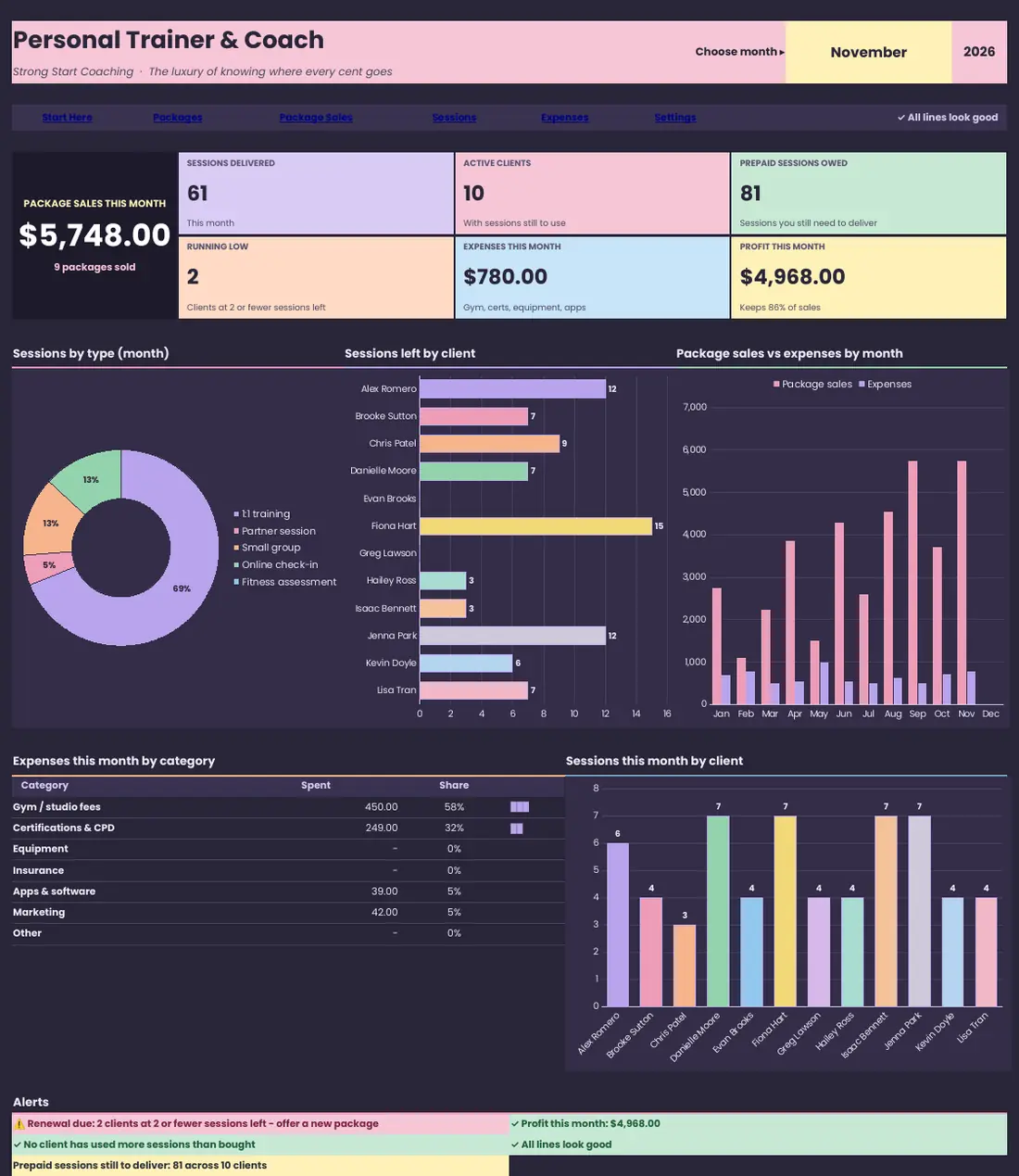
Personal Trainer & Coach Clients spreadsheet dashboard with KPI cards and charts
The real dashboard, shown with sample data. Tap to enlarge.

What the dashboard shows

KPI cards

  • Package sales this month
  • Sessions delivered
  • Active clients
  • Prepaid sessions owed
  • Running low
  • Expenses this month
  • Profit this month

Charts

  • Sessions by type (month)
  • Sessions left by client
  • Package sales vs expenses by month
  • Sessions this month by client

Tracker panel

Expenses this month by category

Alerts

Plain-English warnings when something is over budget, overdue or needs checking, and a green tick when all is well.

What’s inside

  • Start Here – a short guide to set up in minutes
  • Dashboard – KPI cards, charts, trackers and alerts
  • Packages – What you sell: package name, how many sessions it includes and its price.
  • Package Sales – One line each time a client buys a package. The price and sessions fill in from Packages. Type a different price only for discounts. 'Sessions left' shows on each client's latest package line.
  • Sessions – One line per session you deliver. Each line uses one session from that client's package.
  • Expenses – Gym or studio fees, certifications, equipment, insurance, apps and marketing.
  • Settings – your name, currency, categories and rates

Perfect for

  • Personal trainers, fitness and wellness coaches
  • Tracking session packs and renewals
  • Knowing your coaching income each month

How to use it

  1. Settings: add your business name, currency symbol, year and when to flag a client as running low.
  2. Settings: list your clients and rename session types if needed.
  3. Packages: list what you sell with the number of sessions and the price.
  4. Package Sales: add a line every time a client buys a package.
  5. Sessions: log every session you deliver. Expenses: log gym fees, certifications and equipment.
  6. Dashboard: pick a month to see sales, sessions delivered, who is running low and profit.

Good to know

  • Sessions left = all sessions a client has bought - all sessions logged for them. It shows on their latest package line.
  • A minus number means the client has used more sessions than they paid for.
  • Package sales count in the month the package was sold.

Questions

Does the Personal Trainer & Coach Clients work in Google Sheets?

Yes. The download includes an Excel file (.xlsx) and a link to make your own Google Sheets copy. The totals and charts carry across; chart colors in Google Sheets can look slightly different from the Excel version.

Can I change the currency and categories?

Yes. Set your currency symbol, names and categories on the Settings tab. Yellow cells are for typing; formula cells are protected without a password.

Is it a subscription?

No. It is a one-time purchase of $7.99 USD on Etsy with no macros and nothing to renew.

You may also like