Home / Maker & Seller Pricing / Craft Fair & Market Stall Profit Tracker

Maker & Seller Pricing

Craft Fair & Market Stall Profit Tracker Spreadsheet

See which craft fairs and markets are really worth your Saturday: true profit after booth fees, travel, card fees and materials, plus profit per hour.

Light-mode dashboardExcel + Google SheetsInstant download

$5.99 USD, one-time

Coming soon to Etsy · $5.99
  • Sample-data and blank versions
  • No macros, no subscription
  • Editable currency and categories
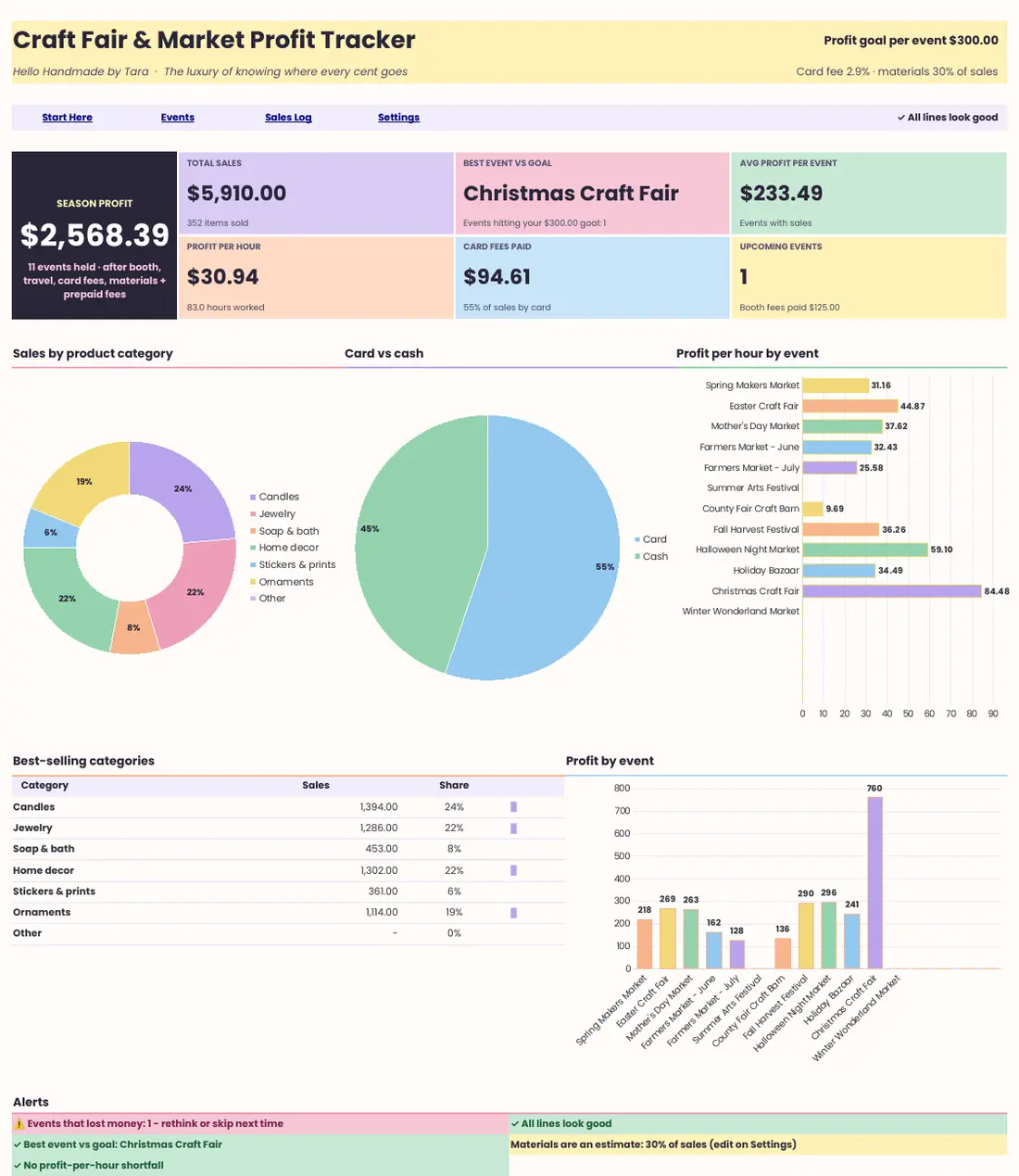
Craft Fair & Market Stall Profit Tracker spreadsheet dashboard with KPI cards and charts
The real dashboard, shown with sample data. Tap to enlarge.

What the dashboard shows

KPI cards

  • Season profit
  • Total sales
  • Best event vs goal
  • Avg profit per event
  • Profit per hour
  • Card fees paid
  • Upcoming events

Charts

  • Sales by product category
  • Card vs cash
  • Profit per hour by event
  • Profit by event

Tracker panel

Best-selling categories

Alerts

Plain-English warnings when something is over budget, overdue or needs checking, and a green tick when all is well.

What’s inside

  • Start Here – a short guide to set up in minutes
  • Dashboard – KPI cards, charts, trackers and alerts
  • Events – One line per fair or market (up to 16 per workbook). Add booth fee, travel/parking, other costs (tent, table cover, snacks) and the hours you worked incl. setup.
  • Sales Log – Log sales per event - one line per sale or a daily total per category and payment type. Pick the event from your Events list.
  • Settings – your name, currency, categories and rates

Perfect for

  • Makers selling at craft fairs, markets and pop-ups
  • Comparing which events are worth your weekend
  • Counting booth fees, travel and time in profit

How to use it

  1. Settings: add your shop name, currency, card reader fee %, materials % and profit goal per event.
  2. Events: add each fair or market with booth fee, travel/parking, other costs and hours worked.
  3. Sales Log: log your sales per event by category, quantity, amount and cash or card.
  4. Events: see sales, card fees, estimated materials, profit and profit per hour for every event.
  5. Settings: profit goals fill in automatically - type over one to set a different goal for an event.
  6. Dashboard: find your best events, your best-selling categories and what your time is really worth.

Good to know

  • Profit = sales - booth fee - travel & parking - other costs - card fees - estimated materials.
  • Profit per hour = event profit รท hours worked (include setup, packing and travel time for a true picture).
  • Card fees use your card reader % on card sales. Check your reader's current rate and edit it on Settings.
  • Upcoming events (no sales yet) show their booth fee as a cost until you log sales.

Questions

Does the Craft Fair & Market Stall Profit Tracker work in Google Sheets?

Yes. The download includes an Excel file (.xlsx) and a link to make your own Google Sheets copy. The totals and charts carry across; chart colors in Google Sheets can look slightly different from the Excel version.

Can I change the currency and categories?

Yes. Set your currency symbol, names and categories on the Settings tab. Yellow cells are for typing; formula cells are protected without a password.

Is it a subscription?

No. It is a one-time purchase of $5.99 USD on Etsy with no macros and nothing to renew.

You may also like